Logout screen, cleanup session and error message on invalid login url #146

Merged
babelouest merged 18 commits from logout-screen into master 2020-06-21 20:23:17 +02:00
babelouest commented 2020-06-19 04:17:19 +02:00 (Migrated from github.com)
  • Handle error in login url
  • Forbid to continue if the connected user has no required scope
  • Clear visible state upon logging out.
  • Implement minimal logout screen - poke @yrammos on this one ;)
- Handle error in login url - Forbid to continue if the connected user has no required scope - Clear visible state upon logging out. - Implement minimal logout screen - poke @yrammos on this one ;)
yrammos commented 2020-06-19 10:03:45 +02:00 (Migrated from github.com)

@babelouest thank you for this ambitious PR.

A number of things seem broken on my end. Am attaching screenshots for some of those things.

  1. We seem to have lost the "continue" screen with the user's photo. In its place, I see the log-in form with the username field disabled and the password field still available. A bug, I suppose, since the user is already logged in.

Screen Shot 2020-06-19 at 10 29 56 AM

  1. The user selection drop-down is (half-)visible even when no user is logged in at all. This is a regression to an issue that was fixed in #136; none of the available dropdown options ("Manage users" and "Add users") is meaningful when no users are in the session. I really liked the flow before this PR, it was wonderfully speedy, intuitive, and reassuring… Hoping there are no plans to change it! What is the intention behind the change, if I may ask?

Screen Shot 2020-06-19 at 10 30 30 AM

  1. I cannot arrive at the log out screen at all. Is it still wired to the "killall" button?

  2. I am locked out of the admin app in the latest commit. My admin account is indeed authorized, but I am not presented with a green Continue button (screenshot below). I am asked to "register a scheme in my profile" but this should not be necessary because my admin scope does not use n-factor authentication.

Screen Shot 2020-06-19 at 10 32 40 AM

@babelouest thank you for this ambitious PR. A number of things seem broken on my end. Am attaching screenshots for some of those things. 1. We seem to have lost the "continue" screen with the user's photo. In its place, I see the log-in form with the username field disabled and the password field still available. A bug, I suppose, since the user is already logged in. ![Screen Shot 2020-06-19 at 10 29 56 AM](https://user-images.githubusercontent.com/1519337/85109748-7fb9d380-b21a-11ea-8bef-690e5ff35f59.png) 2. The user selection drop-down is (half-)visible even when no user is logged in at all. This is a regression to an issue that was fixed in #136; none of the available dropdown options ("Manage users" and "Add users") is meaningful when no users are in the session. I really liked the flow before this PR, it was wonderfully speedy, intuitive, and reassuring… Hoping there are no plans to change it! What is the intention behind the change, if I may ask? ![Screen Shot 2020-06-19 at 10 30 30 AM](https://user-images.githubusercontent.com/1519337/85110027-f3f47700-b21a-11ea-9d6d-5a8185b798da.png) 3. I cannot arrive at the log out screen at all. Is it still wired to the "killall" button? 4. I am locked out of the admin app in the latest commit. My admin account is indeed authorized, but I am not presented with a green Continue button (screenshot below). I am asked to "register a scheme in my profile" but this should not be necessary because my admin scope does not use n-factor authentication. ![Screen Shot 2020-06-19 at 10 32 40 AM](https://user-images.githubusercontent.com/1519337/85110681-ef7c8e00-b21b-11ea-95f6-e630a6080340.png)
babelouest commented 2020-06-19 16:16:32 +02:00 (Migrated from github.com)

Indeed, some new bugs appeared, I'll take care of them. That's why I put those changes in a separate branch, I was afraid it could break legacy code, unfortunately I have no UI tests...

The user selection drop-down is (half-)visible even when no user is logged in at all. This is a regression to an issue that was fixed in #136;

That's a change I made on purpose (but still has bugs). The problem was: you can be logged in the admin page with 3 users: admin, user1 and user2, in this case, only admin has the scope g_admin which grants access to the admin page. In the admin page, if you are connected as admin and switch to user1 by mistake or because you don't know better, you will have no choice but to reconnect via the login page.

To improve this, maybe we could show the other connected users but disable them if they don't have he scope g_admin.

The behavior is similar in the profile page.

Indeed, some new bugs appeared, I'll take care of them. That's why I put those changes in a separate branch, I was afraid it could break legacy code, unfortunately I have no UI tests... > The user selection drop-down is (half-)visible even when no user is logged in at all. This is a regression to an issue that was fixed in #136; That's a change I made on purpose (but still has bugs). The problem was: you can be logged in the admin page with 3 users: admin, user1 and user2, in this case, only admin has the scope `g_admin` which grants access to the admin page. In the admin page, if you are connected as admin and switch to user1 by mistake or because you don't know better, you will have no choice but to reconnect via the login page. To improve this, maybe we could show the other connected users but disable them if they don't have he scope `g_admin`. The behavior is similar in the profile page.
yrammos commented 2020-06-19 16:48:52 +02:00 (Migrated from github.com)

@babelouest I like the idea of showing logged in but non-authorized users as "disabled"! It would be a kind of luxury I haven't seen in any other multi-session environments.

@babelouest I like the idea of showing logged in but non-authorized users as "disabled"! It would be a kind of luxury I haven't seen in any other multi-session environments.
yrammos commented 2020-06-19 16:50:34 +02:00 (Migrated from github.com)

@babelouest Thank you also for merging-in #144. Would appreciate hearing your thoughts about the underlying concern, whenever time allows.

@babelouest Thank you also for merging-in #144. Would appreciate hearing your thoughts about the underlying concern, whenever time allows.
babelouest commented 2020-06-20 15:19:12 +02:00 (Migrated from github.com)

Hello @yrammos ,

I've pushed some changes in the branch

We seem to have lost the "continue" screen with the user's photo.

Fixed, it was a forgotten flag.

The user selection drop-down is (half-)visible even when no user is logged in at all

Fixed

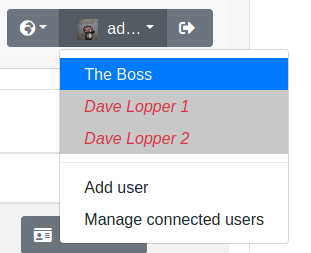
I've also disabled non-authorized users in the dropdown lists in the admin and profile page. Now when a user doesn't have the required scope, it can't be selected in the dropdown list, see screenshot
Capture d’écran du 2020-06-20 09-14-03

I cannot arrive at the log out screen at all. Is it still wired to the "killall" button?

Yes, you have the "killall" button when you're at the manage connected user page, a red "logout all users" in the bottom-right

I am locked out of the admin app in the latest commit. My admin account is indeed authorized, but I am not presented with a green Continue button (screenshot below). I am asked to "register a scheme in my profile" but this should not be necessary because my admin scope does not use n-factor authentication.

It seems that you have added a scheme for the g_admin scope and the user admin doesn't have the scheme registered. You can reset your g_admin scope as explained in the documentation: https://github.com/babelouest/glewlwyd/blob/master/docs/GETTING_STARTED.md#impossible-to-log-in-as-administrator---n-factor-issue

Hello @yrammos , I've pushed some changes in the branch > We seem to have lost the "continue" screen with the user's photo. Fixed, it was a forgotten flag. > The user selection drop-down is (half-)visible even when no user is logged in at all Fixed I've also disabled non-authorized users in the dropdown lists in the admin and profile page. Now when a user doesn't have the required scope, it can't be selected in the dropdown list, see screenshot ![Capture d’écran du 2020-06-20 09-14-03](https://user-images.githubusercontent.com/3966617/85202726-78580000-b2d6-11ea-9d0c-b68c1251c60c.png) > I cannot arrive at the log out screen at all. Is it still wired to the "killall" button? Yes, you have the "killall" button when you're at the manage connected user page, a red "logout all users" in the bottom-right > I am locked out of the admin app in the latest commit. My admin account is indeed authorized, but I am not presented with a green Continue button (screenshot below). I am asked to "register a scheme in my profile" but this should not be necessary because my admin scope does not use n-factor authentication. It seems that you have added a scheme for the `g_admin` scope and the user `admin` doesn't have the scheme registered. You can reset your `g_admin` scope as explained in the documentation: https://github.com/babelouest/glewlwyd/blob/master/docs/GETTING_STARTED.md#impossible-to-log-in-as-administrator---n-factor-issue
babelouest commented 2020-06-21 20:23:03 +02:00 (Migrated from github.com)

@yrammos , I haven't seen other bugs in this branch, I'm merging it into master then

@yrammos , I haven't seen other bugs in this branch, I'm merging it into master then
Sign in to join this conversation.
No reviewers
No milestone
No project
No assignees
1 participant

Notifications
Due date
The due date is invalid or out of range. Please use the format "yyyy-mm-dd".

No due date set.

Dependencies

No dependencies set.

Reference
KittenSquad/glewlwyd!146
No description provided.